
HMI Instruction Set Properties
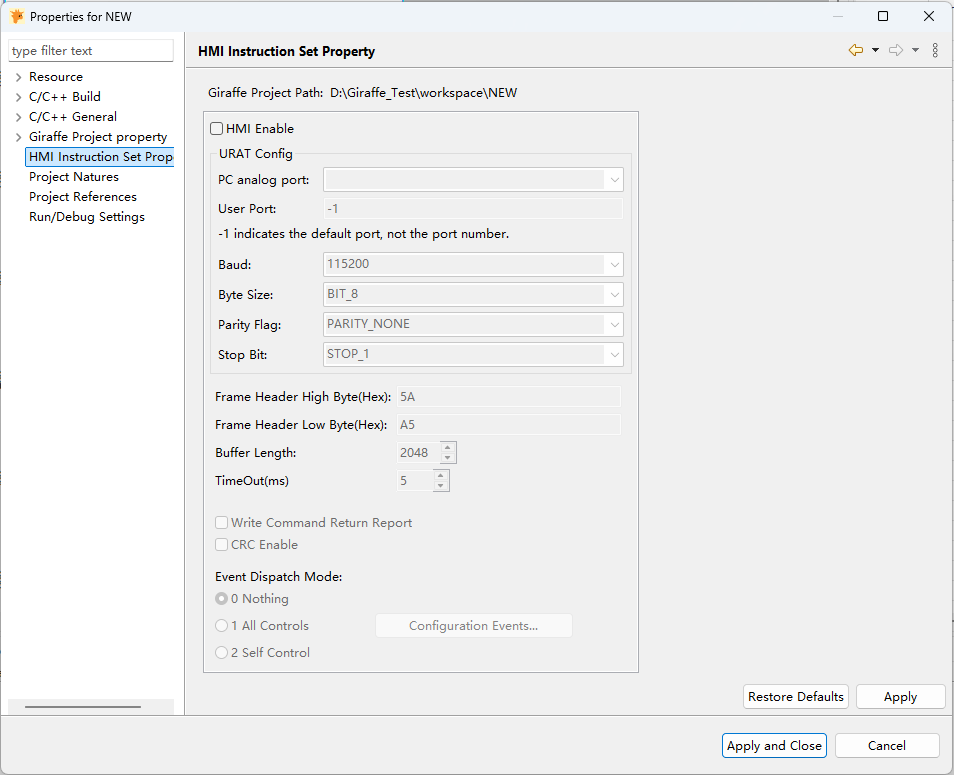
HMI Enable : Enables or disables the entire instruction set communication function; it is disabled by default.
PC analog Port: A virtual serial port used for simulation debugging on the PC, which only takes effect when running in PC simulation mode.
User Port: The physical serial port number used during actual hardware operation. -1 indicates the default port; any other value specifies a custom port number.
Baud: The serial communication rate.
Byte Size The number of valid binary bits contained in each frame of data. The available options are BIT_8 and BIT_7.
Parity Flag: The check method. Available options: No parity, Odd parity, Even parity.
Stop Bit: The frame end flag bit, usually 1 bit.
Frame Header High Byte (Hex): The high 8 bits of the communication frame start flag, used for frame synchronization.
Frame Header Low Byte (Hex): The low 8 bits of the communication frame start flag, which together with the high byte form the complete frame header.
Buffer Length: The size of the transmit/receive data buffer (unit: bytes).
Timeout (ms): The maximum time to wait for a response from the lower computer. If the timeout is exceeded, the communication is deemed to have failed.
Write Command Return Report: When checked, the upper computer will wait for and verify the return result from the lower computer when issuing write commands, ensuring successful execution.
CRC Enable: When enabled, a CRC check code is appended to the communication frame to detect errors during data transmission and improve communication reliability.
Event Dispatch Mode: Used to configure the strategy for reporting control events to the lower computer.
0 None:: No control events are reported; only basic communication is performed.1 All Controls: Events generated by all controls are reported to the lower computer. Click the "Configure Event Commands" button on the right to open the event configuration window, where you can precisely select the event types to be reported.2 Self Controls: Only event types configured via "Select Event Commands to Deliver" for individual controls are reported.
When "2 Self Controls" mode is selected,event reporting is no longer a global configuration, and precise settings must be made in the property interface of each individual control:
In the Special Config category of the control properties, find the Dispatch event commend selection option and click the Click Configure button.
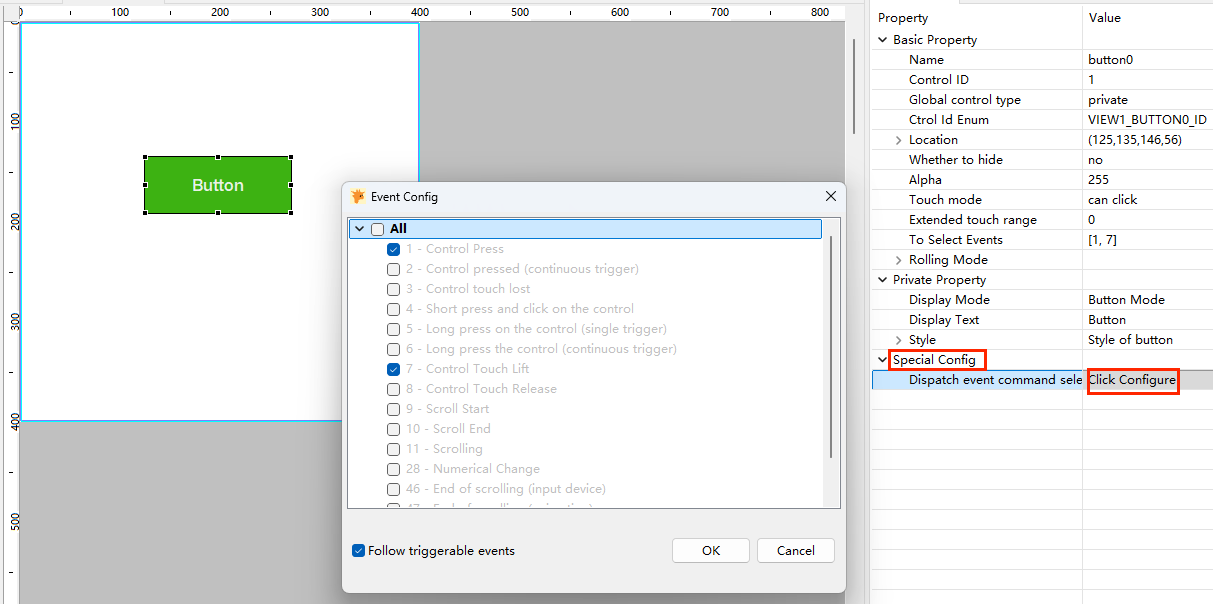
Follow Triggerable Events: When this option is checked (default), the event types reported by the control to the lower computer will automatically be fully consistent with those selected in "Triggerable Events". If the selection inTo Select Eventsis modified, the configuration ofDispatch event commend selectionwill be automatically updated synchronously.
After uncheckingFollow Triggerable Events, you can manually select the event types to be reported. For example, a control can respond to both "Control Pressed" and "Control Touch Lifted" events, but you can choose to report only "Control Touch Lifted" to reduce unnecessary communication traffic.
Giraffe HMI Instruction Set
Command Introduction
| Definition | Header | Data Length | R/W | Instruction Type | Data | CRC Checksum |
|---|---|---|---|---|---|---|
| Byte Count | 2 | 1/2 | 1 | N | 2 | 2 |
| Data | 5A A5 | All data for this parameter | 11(R)/22(W) | B0/B1/... | Control Command + Data | CRC16 |
Data Length: Command Type:
Data Length
If the highest bit of the first byte is 1, i.e. 0x80, it means that the parameter is 2 bytes, otherwise it is 1 byte (1-128).
Read/Write Instruction
The instruction reads and writes in the form of a parameter, 11(read)/22(write)
Read data:
TX: Frame Header + Data Length + 11 + Instruction Type + Control Command + (CRC16)
RX: Frame Header + Data Length + 11 + Instruction Type + Control Command + Data + (CRC16)
Write data:
TX: Frame Header + Data Length + 22 + Instruction Type + Control Command + Data + (CRC16)
RX: Frame Header + Data Length + 22 + Instruction Type + Control Command + 00/01 + (CRC16)
Notes:In received data, 00 indicates a successful write operation; non-zero values indicate failure.
Examples:
Read Driver Version
TX : 5A A5 04 11 B0 00 02
RX (Success): 5A A5 0A 11 B0 00 02 31 2E 34 2E 35 00 // Version: 1.3.5
RX (Failure): 5A A5 04 11 B0 00 02 // Returns original command with no data.Write Backlight Brightness
TX: 5A A5 04 22 B0 02 32 // Set brightness to 50
RX: 5A A5 04 22 B0 02 00 // 00 = success, non-zero = failure. Note: This response can be disabled.
CRC16 Sample Code
u16 crc16_ccitt(u8 * tmp, u32 num)
{
    u16 CrcTmp = 0x0;
    u32  i = 0, j = 0;
    u16 s = 0;
    u16 tmpcrc = 0;

    for (i = 0; i < num; i++)
    {
        tmpcrc  = tmp[i] << 8;
        tmpcrc  &= 0xff00;
        CrcTmp  ^= tmpcrc;

        for (j = 0; j < 8; j++)
        {
            s = CrcTmp & 0x8000;
            CrcTmp <<= 1;
            CrcTmp  &= ~(0x0001);

            if(s){
                CrcTmp ^= 0x1021;
            }
        }
    }

    return CrcTmp;
}
Documentation Conventions
Parameter Type Definitions
| Definition | Identifier | Byte Count | Data Range | Description |
|---|---|---|---|---|
| String | string | N | Variable byte length, string terminated by 00 | |
| Signed Byte | s8 | 1 | -128 ~ 127 | Specific range depends on parameter description |
| Unsigned Byte | u8 | 1 | 0 ~ 255 | Specific range depends on parameter description |
| Signed 2-byte | s16 | 2 | -32,768 ~ 32,767 | Specific range depends on parameter description |
| Unsigned 2-byte | u16 | 2 | 0~65,535 | Specific range depends on parameter description |
| Signed 4-byte | s32 | 4 | -$2^{31}$ ~ $2^{31}$-1 | Specific range depends on parameter description |
| Unsigned 4-byte | u32 | 4 | 0 ~ $2^{32}$ | Specific range depends on parameter description |
Parameter Description Rules
- A single instruction may include multiple parameters, described as
param1,param2, etc. - The parameter type is specified in the first parenthesis after
param. For example,param1(string)indicates that parameter 1 is of typestring, conforming to the byte count and data range defined in the parameter type table. - The data range is determined by the parameter type. However, some parameters may have a smaller range than the type allows. This is specified in the second parenthesis. For example,
param1(u8)(0-100)indicates that parameter 1 is of typeu8with a range of 0-100. If no second parenthesis is provided, the range defaults to the type's full range. - After describing the type and range, the parameter's functionality is explained after a colon.
- Commands are sent and received in the order of parameters' numbering.
Instruction Types
| Definition | Instruction Type |
|---|---|
| System Instructions | B0 |
| view Function Control | B1 |
| ctrl Function Control | B2 |
Instruction Set
System Instructions (0xB0)
The instruction data for system instructions = function command + input parameters + read/write parameters.
| Definition | R/W | Function Command | Input Parameters | Read/Write Parameters | Description |
|---|---|---|---|---|---|
| Get Version | R | 00 | param1(u8)(00-02): Version type 00-APP version; 01-UI version; 02-Driver version | param1(string): Version number | User-designed code version |
| Reset Report | R | 01 | None | param1(u16)(fixed AA BB): Reset identifier | Active report. When the device powers on or restarts unexpectedly, the screen sends AA BB to notify the host of a restart. The host can detect this and restart accordingly. |
| Reset Device | W | 01 | None | param1(u16)(fixed CC DD): Reset identifier | Sending CC DD will reset the screen. If the host restarts unexpectedly, this command can be used to synchronize the screen restart. |
| Backlight Brightness | R/W | 02 | None | param1(u8)(0-100): Brightness value | |
| Tone (Buzzer) | R/W | 03 | None | param1(u8): Number of beepsparam2(u16): Interval between beeps (ms)param3(u16): Duration of each beep (ms) | param3: Applies to the buzzer. This setting also affects touch feedback tones. Default is 100ms if not set. |
| Touch Configuration | R/W | 04 00 | None | param1(u8): Configuration parameter | bit0: 1-Disable touch, 0-Enable touch bit1: 1-Beep on touch, 0-No beep on touch bit2: 1-Beep in valid touch area, 0-Beep in entire touch area bit3: 1-Beep on release, 0-Beep on press bit4: 1-Upload coordinates on press, 0-Do not upload on press bit5: 1-Upload coordinates on release, 0-Do not upload on release bit6: 1-Upload coordinates every 100ms while holding, 0-Do not upload bit7: 1-Enter touch calibration if a specific area is tapped 20 times within 5 seconds, 0-Disable this feature |
| Touch Coordinates | R | 04 01 | None | param1(u8)(0-1): Touch event 0-Release, 1-Pressparam2(u16)(0-4096): X coordinateparam3(u16)(0-4096): Y coordinate | Active report of touch coordinates |
| RTC | R/W | 05 | None | param1(u16): Screen saver page (0 = no screen saver)param2(u16): Standby time (0 = no standby)param3(u8): Standby brightnessparam4(u16): Screen-off time (0 = screen stays on)param5(u8): Screen-off brightnessparam6(u8): Activation brightnessparam7(u16): Activation page (0 = use pre-standby interface) | |
| Standby Status | R/W | 06 01 | param1(u8): Standby status 1 - Enter standby 0 - Exit standby |
View Instructions (0xB1)
The instruction data for view control instructions = function command + input parameters + read/write parameters.
| Definition | R/W | Function Command | Input Parameters | Read/Write Parameters | Description |
|---|---|---|---|---|---|
| Display View | W | 00 | None | param1(u16): View ID | Displays the specified view (user-designed code version) |
| Get Current View ID | R | 01 | param1(u8)(0-2) :Layer0 - UI Layer;1 - Status Layer;2 - Top Layer | param1(u16): View ID | Retrieves the ID of the currently displayed view for the specified layer |
Ctrl Instructions (0xB2)
The instruction data for control instructions = control type command + function command + page ID + control ID + input parameters + read/write parameters.
Control Type Command: u8 (single-byte), including:
Common Instructions (0xF0)
Label Control Instructions (0x00)
Button Control Instructions (0x01)
And other control type instructions.
Page ID / Control ID: u16 (double-byte).
Common Instructions (0xF0)
| Definition | R/W | Function Command | Input Parameters | Read/Write Parameters | Description |
|---|---|---|---|---|---|
| Set Control Visibility | W | 00 | None | param1(u8)(0-1):Visibility1 - Hide control ; 0 - Show control | Sets whether the control is hidden or visible. |
| Get Control Width | R | 01 | None | param1(u16):Control width value | Retrieves the width of the control. |
| Get Control Height | R | 02 | None | param1(u16):Control height value | Retrieves the height of the control. |
| Set Control Position | W | 03 | None | param1(s16):X-axis coordinateparam2(s16):Y-axis coordinate | Sets the display position of the control. |
| Set Control Size | W | 04 | None | param1(u16):Control widthparam2(s16):Control height | Sets the display size of the control. |
| Set Control Transparency | W | 05 | None | param1(u8):Control transparency | Sets the transparency of the control. |
| Set Control Z-Order | W | 06 | None | param1(u8)(0-1):Z-order1 - Bring to front; 0 - Send to back | Sets whether the control is brought to the front or sent to the back. |
| Set Control Click Mode | W | 07 | None | param1(u8)(0-1):Click mode1 - Clickable; 0 - Disable touch | |
| Receive Click Event | R | 87 00 | None | Auto Sendparam1(u8):Click event enumerationFor details,Event Enumeration Values | |
| Expand Touch Area | W | 08 | None | param1(u16):Expansion value | Expands the touchable area of the control. |
| Set Relative Position | W | 09 | param1(u16):Reference control ID | param1(u8)(1-15): Alignment direction1 - Top-left inside 2 - Top-center inside 3 - Top-right inside 4 - Bottom-left inside 5 - Bottom-center inside 6 - Bottom-right inside 7 - Left-center inside 8 - Right-center inside 9 - Center alignment A - Top-left outside B - Top-center outside C - Top-right outside D - Bottom-left outside E - Bottom-center outside F - Bottom-right outside 10 - Left-top outside 11 - Left-center outside 12 - Left-bottom outside 13 - Right-top outside 14 - Right-center outside 15 - Right-bottom outside param2(s16):X-axis offset (0 for direct alignment, <0 for left shift, >0 for right shift)param1(s16):Y-axis offset | Sets the relative position of the control based on a reference control. |
| Get Child Control Count | R | 0A | None | param1(u16):Number of child controls | |
| Get Control Coordinates | R | 0B | None | param1(s16):X-axis coordinate param1(s16):Y-axis coordinate | |
| Set Control Scroll Amount (with Animation) | W | 0C | None | param1(u8)(0-1):Enable animation 0 - No; 1 - Yes param2(s16):X-axis scroll amount param3(s16):Y-axis scroll amount | |
| Get Control Scroll Amount | R | 0D | None | param1(s16):X-axis coordinate param2(s16):Y-axis coordinate |
Label Control Instructions (0x00)
| Definition | R/W | Function Command | Input Parameters | Read/Write Parameters | Description |
|---|---|---|---|---|---|
| Text Content | R/W | 00 | None | param1(string):Text content | Reads or writes the text displayed in the label. |
| Set Text Color | W | 01 | None | param1(u32):Text color | e.g., RGB888 format: 0xRRGGBB |
| Set Text Size | W | 02 | None | param1(u16):Font size | |
| Set Long Text Display Mode | W | 03 | None | param1(u8)(0-4):Display mode0 - Fixed width, wrap text and adjust height 1 - Fixed size, show ellipsis (...) for overflow 2 - Fixed size, auto-scroll text forward/backward 3 - Fixed size, auto-scroll text circularly 4 - Fixed size, clip overflow text | Configures how long text is displayed when exceeding the control area. |
| Set Long Text Scroll Speed | W | 04 | None | param1(u16):Scroll speed | |
| Set Text Alignment | W | 05 | None | param1(u8):Alignment mode(1-3,10,20,30,or combined values)Horizontal: 1 - Left-aligned 2 - Center-aligned 3 - Right-aligned Vertical: 10 - Top-aligned 20 - Middle-aligned 30 - Bottom-aligned Combined: e.g., 22 = Horizontal center (2) + Vertical middle (20) | Sets text alignment within the label. Combine horizontal and vertical modes by adding values (e.g., 22 = center-aligned). |
Button Control Instructions (0x01)
| Definition | R/W | Function Command | Input Parameters | Read/Write Parameters | Description |
|---|---|---|---|---|---|
| Button Text Content | W | 00 | None | param1(string):Text content | |
| Button State Text Color | W | 01 | None | param1(u8):Button state 0 - Normal/Released 1 - Toggled/Selected 2 - Clicked 4 - Focused 8 - Edited 20 - Pressed 40 - Scrolling 80 - Disabled param2(u32):Text color | |
| Button Text Size | W | 02 | None | param1(u16):Font size | |
| Button Display Mode | W | 03 | None | param1(u8)(0-1):Display mode 0 - Button mode 1 - Toggle mode | |
| Button State | R/W | 04 | None | param1(u8):Button state 0 - Normal/Released 1 - Toggled/Selected 2 - Clicked 4 - Focused 8 - Edited 20 - Pressed 40 - Scrolling 80 - Disabled |
Image Control Instructions (0x02)
| Definition | R/W | Function Command | Input Parameters | Read/Write Parameters | Description |
|---|---|---|---|---|---|
| Display/Get Image | W/R | 00 | None | param1(string):Image name and path | Sets or retrieves the image displayed in the control. |
| Rotate Image | W | 01 | None | param1(u16):Rotation angle | |
| Set Rotation/Scale Center | W | 02 | None | param1(s16):X-axis coordinate param2(s16):Y-axis coordinate | |
| Set Image Scale | W | 03 | None | param1(u16): Scale factor128 - Half size 256 - Original size 512 - Double size |
Image Button Control Instructions (0x03)
| Definition | R/W | Function Command | Input Parameters | Read/Write Parameters | Description |
|---|---|---|---|---|---|
| Set Image Button Text | W | 00 | None | param1(string):Text content | |
| Set Image Button Text Color | W | 01 | None | param1(u8)(0-5):Button state 0 - Normal/Released 1 - Normal/Pressed 2 - Normal/Disabled 3 - Toggle/Released 4 - Toggle/Pressed 5 - Toggle/Disabled param2(u32):Text color (e.g., 0xRRGGBB) | |
| Set Image Button Text Size | W | 02 | None | param1(U16):Font size | |
| Set Image Button State | W | 03 | None | param1(u8)(0-5):Button state 0 - Normal/Released 1 - Normal/Pressed 2 - Normal/Disabled 3 - Toggle/Released 4 - Toggle/Pressed 5 - Toggle/Disabled | |
| Set Image Button State Image | W | 03 | None | param1(u8)(0-5):Button state 0 - Normal/Released 1 - Normal/Pressed 2 - Normal/Disabled 3 - Toggle/Released 4 - Toggle/Pressed 5 - Toggle/Disabled param2(string):Image name |
Line Control Instructions (0x04)
| Definition | R/W | Function Command | Input Parameters | Read/Write Parameters | Description |
|---|---|---|---|---|---|
| Set Line Style | W | 00 | None | param1(u32):Line color (e.g., 0xRRGGBB) param2(u16):Line widthparam3(u8):Transparencyparam4(u8):Corner radius |
Arc Control Instructions (0x05)
| Definition | R/W | Function Command | Input Parameters | Read/Write Parameters | Description |
|---|---|---|---|---|---|
| Set Arc Display Style | W | 00 | param1(u8)(0-1):Style part0-Background,1-Foreground | param1(u32):Line color param2(u16):Line widthparam3(u8):Transparencyparam4(u8):Corner radius | |
| Set Slider Color | W | 01 | None | param1(u32):Color | |
| Set Value Range | W | 02 | None | param1(s16):Minimum value param2(s16):Maximum value | |
| Current Value | W/R | 03 | None | param1(s16):Current Value | |
| Set Rotation Angle | W | 04 | None | param1(u16):Rotation angle | |
| Set Start and End Angles | W | 05 | None | param1(u16):Start angle param2(u16):End angle |
Bar Control Instructions (0x06)
| Definition | R/W | Function Command | Input Parameters | Read/Write Parameters | Description |
|---|---|---|---|---|---|
| Set Bar Color | W | 00 | None | param1(u32):Color | |
| Progress Value | W/R | 01 | None | param1(s16):Current value | |
| Set Value Range | W | 02 | None | param1(s16):Minimum value param2(s16):Maximum value |
Slider Control Instructions (0x07)
| Definition | R/W | Function Command | Input Parameters | Read/Write Parameters | Description |
|---|---|---|---|---|---|
| Set Slider Color | W | 00 | None | param1(u32):Color | |
| Progress Value | W/R | 01 | None | param1(s16):Current value | |
| Set Value Range | W | 02 | None | param1(s16):Minimum value param2(s16):Maximum value |
SwControl Instructions (0x08)
| Definition | R/W | Function Command | Input Parameters | Read/Write Parameters | Description |
|---|---|---|---|---|---|
| Switch State | W/R | 00 | None | param1(u8)(0-1):0 - Off; 1 - On |
Checkbox Control Instructions (0x09)
| Definition | R/W | Function Command | Input Parameters | Read/Write Parameters | Description |
|---|---|---|---|---|---|
| Set Display Text | W | 00 | None | param1(string):Display text | |
| Checked State | W/R | 01 | None | param1(u8)(0-1):0 - Unchecked; 1 - Checked | |
| Disable Control | W/R | 02 | None | param1(u8)(0-1):0 - Enabled; 1 - Disabled |
Mbox Control Instructions (0x0A)
| Definition | R/W | Function Command | Input Parameters | Read/Write Parameters | Description |
|---|---|---|---|---|---|
| Set Title Content | W | 00 | None | param1(string):Text content | |
| Set Message Content | W | 01 | None | param1(string):Text content | |
| Set Auto-Close Delay | W | 02 | None | param1(u16):Delay time (ms) | |
| MessageBox Control | W | 03 | None | param1(u8)(0-1):0 - Close message box 1 - Open message box |
Tileview Control Instructions (0x0B)
| Definition | R/W | Function Command | Input Parameters | Read/Write Parameters | Description |
|---|---|---|---|---|---|
| Manually Switch Tile by ID | W | 00 | None | param1(u8)(0-1):Enable animation 0 - Disable 1 - Enableparam2(u16):Row IDparam3(u16):Column ID |
Txtbox Control Instructions (0x0C)
| Definition | R/W | Function Command | Input Parameters | Read/Write Parameters | Description |
|---|---|---|---|---|---|
| Add String | W | 00 | None | param1(str):String | |
| Add Single Character | W | 01 | None | param1(u32):Character | |
| Delete Single Character | W | 02 | None | param1(u8)(0-1):Delete direction 0 - Left of cursor 1 - Right of cursor | |
| Text Content | W/R | 03 | None | param1(str):String | |
| Toggle Password Mode | W | 04 | None | param1(u8)(0-1): 0 - Disable 1 - Enable | |
| Move Cursor One Step | W | 05 | None | param1(u8)(0-3):Direction0 - Move right 1 - Move left 2 - Move down (only works for multi-line text) 3 - Move up (only works for multi-line text) |
List Control Instructions (0x0D)
| Definition | R/W | Function Command | Input Parameters | Read/Write Parameters | Description |
|---|---|---|---|---|---|
| Delete a Button | W | 00 | None | param1(u16):Button ID | |
| Delete All Buttons | W | 01 | None | None | |
| Button Text | W/R | 02 | param1(u16):Button ID | param1(string):Text content |
Droplist Control Instructions (0x0E)
| Definition | R/W | Function Command | Input Parameters | Read/Write Parameters | Description |
|---|---|---|---|---|---|
| Add an Item | W | 00 | param1(u16):Button ID | param1(string):Text content | |
| Modify Item Text | W | 01 | param1(u16):Button ID | param1(string):Text content | |
| Delete an Item | W | 02 | None | param1(u16):Button ID | |
| Control Dropdown | W | 03 | None | param1(u8):Expand/Collaps 0 - Collapse; 1 - Expand |
Rollist Control Instructions (0x0F)
| Definition | R/W | Function Command | Input Parameters | Read/Write Parameters | Description |
|---|---|---|---|---|---|
| Add or Insert an Option | W | 00 | param1(u16):Button ID | param1(string):Text content | |
| Modify Option Text | W | 01 | param1(u16):Button ID | param1(string):Text content | |
| Delete an Option | W | 02 | None | param1(u16):Button ID |
GIF Control Instructions (0x10)
| Definition | R/W | Function Command | Input Parameters | Read/Write Parameters | Description |
|---|---|---|---|---|---|
| Control GIF | W | 00 | None | param1(u8):Control option 0 - Reset GIF (restart playback)1 - Pause GIF playback 2 - Resume GIF playback | |
| Set Playback Count | W | 01 | None | param1(u16):Playback count | |
| Set GIF Image | W | 02 | None | param1(str):Path/Name of the GIF file |
QR Code Control Instructions (0x11)
| Definition | R/W | Function Command | Input Parameters | Read/Write Parameters | Description |
|---|---|---|---|---|---|
| Update QR Code Data | W | 00 | None | param1(str):QR code information |
Video Control Instructions (0x12)
| Definition | R/W | Function Command | Input Parameters | Read/Write Parameters | Description |
|---|---|---|---|---|---|
| Set Video Resource | W | 00 | None | param1(str):Path/Name of the video file | |
| Playback State | W/R | 01 | None | param1(u8)(0-3):Playback state0 - Start playback 1 - Stop playback 2 - Pause playback 3 - Resume playback | |
| Set Volume | W | 02 | None | param1(u8):Volume level | |
| Set Video Position and Size | W | 03 | None | param1(u16):X-axis coordinate param2(u16):Y-axis coordinate param3(u16):Width param4(u16):Height | |
| Set Video Loop | W | 04 | None | param1(u8)(0-1):Loop mode 0 - No loop 1 - Loop |
Keyboard Control Instructions (0x13)
| Definition | R/W | Function Command | Input Parameters | Read/Write Parameters | Description |
|---|---|---|---|---|---|
| Get Active Button ID | R | 00 | None | param1(u32):Button ID | |
| Get Button String by ID | R | 01 | param1(u16):Button ID | param1(str):Button string | Retrieves the string associated with a specific keyboard button by its ID. |
Spinbox Control Instructions (0x14)
| Definition | R/W | Function Command | Input Parameters | Read/Write Parameters | Description |
|---|---|---|---|---|---|
| Current Value | W/R | 00 | None | param1(s32):Value | |
| Move Cursor | W | 01 | None | param1(u8)(0-1):Direction 0 - Move left; 1 - Move right | |
| Cursor Position Data Control | W | 02 | None | param1(u8)(0-1):Data control 0 - Decrease by one unit; 1 - Increase by one unit |
Table Control Instructions (0x15)
| Definition | R/W | Function Command | Input Parameters | Read/Write Parameters | Description |
|---|---|---|---|---|---|
| Set Cell Content | W | 00 | None | param1(u16):Row number param2(u16):Column number param3(str):Text content | |
| Set Column Width | W | 01 | None | param1(u16):Column number param2(u16):Width | |
| Merge Right Cells | W | 02 | None | param1(u16):Row number param2(u16):Column number | |
| Set Table Style | W | 03 | None | param1(u32):Line color param2(u8):Line width param3(u8):Transparency param4(u8):Inner fill transparency param5(u32):Fill color |
Button Matrix Control Instructions (0x16)
| Definition | R/W | Function Command | Input Parameters | Read/Write Parameters | Description |
|---|---|---|---|---|---|
| Get Button String by ID | R | 00 | param1(u16):Button ID | param1(str):Button string | |
| Set Button Options by ID | W | 01 | None | param1(u8)(0-1):Set/Clear 0 - Clear options 1 - Set options param2(u16):Button ID param3(u16):Control options 10 - Hide button 20 - Disable repeat on long press 40 - Disable button 80 - Set button to toggle mode 100 - Set button to toggled state 200 - Enable: Send LV_EVENT_VALUE_CHANGE on click; Disable: Send LV_EVENT_VALUE_CHANGE on press400 - Show button label in popup when pressed | |
| Set All Buttons Options | W | 02 | None | param1(u8)(0-1):Set/Clear 0 - Clear options 1 - Set options param3(u16):Control options 10 - Hide button 20 - Disable repeat on long press 40 - Disable button 80 - Set button to toggle mode 100 - Set button to toggled state 200 - Enable: Send LV_EVENT_VALUE_CHANGE on click; Disable: Send LV_EVENT_VALUE_CHANGE on press400 - Show button label in popup when pressed | |
| Check Button Option | R | 03 | param1(u16):Button ID param2(u16):Control option 10 - Hide button 20 - Disable repeat on long press 40 - Disable button 80 - Set button to toggle mode 100 - Set button to toggled state 200 - Enable: Send LV_EVENT_VALUE_CHANGE on click; Disable: Send LV_EVENT_VALUE_CHANGE 400 - Show button label in popup when pressed | param1(u8)(0-1): 0 - Option not set; 1 - Option set | |
| Set Button Width | W | 04 | None | param1(u8):Width param2(u16):Button ID | |
| Enable Button Uniqueness | W/R | 05 | None | param1(u8)(0-1): 0 - Disable; 1 - Enable |